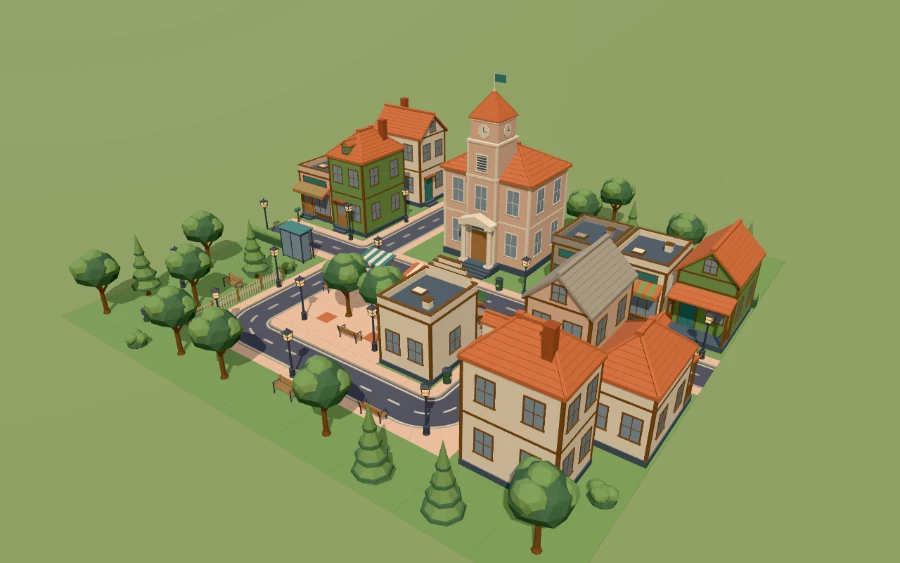
React Three Fiber integration
Add stylized-town@0.4.0 to a Vite project and render its tested scene with React Three Fiber. The dependency setup is the starter's; the entry file is the one the MCP tool get_integration_guide returns (generated from the catalog, then built and rendered in our tests).
1. Project and SDK
mkdir my-town && cd my-town
mkdir -p vendor src
cp <folder with the SDK tarballs>/*.tgz vendor/
This setup resolves 5 SDK tarballs from vendor/: agent-ready-assets-asset-cli-0.5.1.tgz, agent-ready-assets-contracts-0.5.1.tgz, agent-ready-assets-customization-0.5.1.tgz, agent-ready-assets-runtime-r3f-0.5.1.tgz, agent-ready-assets-runtime-three-0.5.1.tgz.
What the placeholders in the commands mean
<registry origin>and<site origin>: the address of this website, scheme and host only (for examplehttps://followed by the host name in your address bar, no path). The website, the account service and the catalog registry share this one origin; the MCP server is at<registry origin>/mcp. The CLI accepts https only (plain http only for a local loopback registry).<API token from your account page>: create one on your account page after signing in. It installs only what your account is entitled to; the free sampler needs no token.<folder with the SDK tarballs>: the folder with the SDK.tgzfiles. The SDK packages come as tarballs, not through the public npm registry. See what you need.- Run
npx agent-ready-assets …only inside the project where the SDK is installed: npx then runs the project's own CLI fromnode_modules/.bin. Outside such a project npx would look for a package of that name on the public npm registry, where we publish none — do not run it there (pnpm exec agent-ready-assets …never downloads anything).
{
  "name": "starter-r3f",
  "version": "0.1.0",
  "private": true,
  "type": "module",
  "description": "Minimal Vite + React Three Fiber starter for the stylized-town kit: installs the kit with the agent-ready-assets CLI and renders a small snapped scene (one part swap, one recolour) with @agent-ready-assets/runtime-r3f. No Blender, no Python.",
  "scripts": {
    "dev": "vite",
    "build": "vite build",
    "preview": "vite preview",
    "typecheck": "tsc --noEmit",
    "kit:add": "agent-ready-assets kit add $(node -p \"require('./src/scenes/starter.scene.json').kit\") --to public/assets",
    "validate": "agent-ready-assets verify && agent-ready-assets scene validate src/scenes/starter.scene.json --resolve",
    "verify-project": "agent-ready-assets verify-project --browser chromium"
  },
  "dependencies": {
    "@agent-ready-assets/runtime-r3f": "file:vendor/agent-ready-assets-runtime-r3f-0.5.1.tgz",
    "@agent-ready-assets/runtime-three": "file:vendor/agent-ready-assets-runtime-three-0.5.1.tgz",
    "@react-three/fiber": "9.8.2",
    "react": "19.3.1",
    "react-dom": "19.3.1",
    "three": "0.186.1"
  },
  "devDependencies": {
    "@agent-ready-assets/asset-cli": "file:vendor/agent-ready-assets-asset-cli-0.5.1.tgz",
    "@playwright/test": "1.64.1",
    "@types/react": "19.3.0",
    "@types/react-dom": "19.3.0",
    "@types/three": "0.186.0",
    "typescript": "7.0.2",
    "vite": "8.3.5"
  }
}
# Pre-release: the Agent-Ready Assets SDK packages are not on a public npm registry yet. Put the packed SDK tarballs you
# received into vendor/; these overrides resolve the SDK's internal packages to them. Everything else comes from npm.
overrides:
  '@agent-ready-assets/contracts': file:vendor/agent-ready-assets-contracts-0.5.1.tgz
  '@agent-ready-assets/customization': file:vendor/agent-ready-assets-customization-0.5.1.tgz
  '@agent-ready-assets/runtime-three': file:vendor/agent-ready-assets-runtime-three-0.5.1.tgz

engineStrict: true
saveExact: true
{
  "compilerOptions": {
    "target": "es2022",
    "lib": ["es2023", "dom", "dom.iterable"],
    "module": "preserve",
    "moduleResolution": "bundler",
    "resolveJsonModule": true,
    "allowImportingTsExtensions": true,
    "noEmit": true,
    "strict": true,
    "jsx": "react-jsx",
    "isolatedModules": true,
    "verbatimModuleSyntax": true,
    "skipLibCheck": true
  },
  "include": ["src"]
}
pnpm install2. Install the kit
export AGENT_READY_ASSETS_REGISTRY=<registry origin>
export AGENT_READY_ASSETS_TOKEN=<API token from your account page>
npx agent-ready-assets kit add stylized-town@0.4.0 --to public/assets
npx agent-ready-assets verify
3. Entry files
entry point: assembles the kit's tested scene town-customized (scene 1.1.0, connector snapping).
<!doctype html>
<html lang="en">
  <head>
    <meta charset="utf-8" />
    <meta name="viewport" content="width=device-width, initial-scale=1" />
    <title>Stylized Town: modular warm toy town</title>
  </head>
  <body>
    <div id="root" style="width: 100vw; height: 100vh"></div>
    <script type="module" src="/src/main.tsx"></script>
  </body>
</html>
// kit stylized-town@0.4.0 with React Three Fiber (scene 1.1.0, connector snapping)
// Generated by the Agent-Ready Assets integration guide (target: React Three Fiber, SDK 0.5.1, tested with three 0.186.1).
// Assets are served from this project's own public/ folder; no CDN, no Blender.
import { StrictMode, useEffect, useState } from 'react';
import { createRoot } from 'react-dom/client';
import { Canvas } from '@react-three/fiber';
import { Asset, AssetLibraryProvider, OptimizedScene } from '@agent-ready-assets/runtime-r3f';
import { AssetLibrary, type ResolvedInstance } from '@agent-ready-assets/runtime-three';

const KIT_URL = '/assets/stylized-town/kit.json';
const SCENE_URL = '/assets/stylized-town/scenes/town-customized.scene.json';

/** Marks the canvas once every <Asset> reported onReady (handy for tests). */
function useReadyFlag(expected: number): () => void {
  const [count, setCount] = useState(0);
  useEffect(() => {
    if (count >= expected) document.querySelector('canvas')?.setAttribute('data-ready', 'true');
  }, [count, expected]);
  return () => setCount((n) => n + 1);
}

/** A 3/4 view over the resolved instance positions. */
function cameraFor(instances: ResolvedInstance[]): { position: [number, number, number]; target: [number, number, number] } {
  const xs = instances.map((i) => i.position_m[0]);
  const zs = instances.map((i) => i.position_m[2]);
  const cx = (Math.min(...xs) + Math.max(...xs)) / 2;
  const cz = (Math.min(...zs) + Math.max(...zs)) / 2;
  const r = Math.max(Math.max(...xs) - Math.min(...xs), Math.max(...zs) - Math.min(...zs)) / 2 + 6;
  return { position: [cx + r * 0.9, r * 0.9, cz + r * 1.3], target: [cx, 0, cz] };
}

function Town({ library, instances }: { library: AssetLibrary; instances: ResolvedInstance[] }) {
  const onReady = useReadyFlag(instances.length);
  const view = cameraFor(instances);
  return (
    <Canvas camera={{ position: view.position, fov: 40 }} onCreated={({ camera }) => camera.lookAt(...view.target)} gl={{ preserveDrawingBuffer: true }}>
      <color attach="background" args={['#e9e4da']} />
      <hemisphereLight args={[0xffffff, 0x8d7c64, 1.4]} />
      <directionalLight position={[4, 8, 5]} intensity={2} />
      <mesh rotation-x={-Math.PI / 2} position={[view.target[0], -0.02, view.target[2]]}>
        <planeGeometry args={[200, 200]} />
        <meshStandardMaterial color="#8fa86a" />
      </mesh>
      <AssetLibraryProvider library={library}>
        {/* SDK 0.5.0: repeated meshes drawn with GPU instancing; same image, customization, clips, picking */}
        <OptimizedScene>
          {instances.map((i) => (
            // resolved world transform: placed instances as written, snapped ones from their connector frames
            <Asset key={i.instance_id} instanceId={i.instance_id} assetId={i.asset} customize={Object.keys(i.values).length ? i.values : undefined} position={i.position_m} quaternion={i.quaternion_xyzw} onReady={onReady} onError={(e) => console.error(i.instance_id, e)} />
          ))}
        </OptimizedScene>
      </AssetLibraryProvider>
    </Canvas>
  );
}

async function main(): Promise<void> {
  const library = await AssetLibrary.fromKit(KIT_URL);
  const sceneJson: unknown = await (await fetch(SCENE_URL)).json();
  // Validate and resolve before rendering: unknown assets/versions/capabilities and every snapping problem
  // (SNAP_INCOMPATIBLE, SNAP_OCCUPIED, INSTANCES_OVERLAP, ...) are refused with structured errors.
  const checked = await library.validateScene(sceneJson);
  if (!checked.ok) throw new Error(checked.issues.map((i) => `${i.code}/${i.reason}: ${i.message}`).join('; '));
  createRoot(document.getElementById('root')!).render(<StrictMode><Town library={library} instances={checked.instances} /></StrictMode>);
}

main().catch((error: unknown) => console.error(error));
TypeScript: the SDK's declarations ship next to its JavaScript (node_modules/@agent-ready-assets/runtime-r3f/dist/index.d.ts) and resolve from the plain import; npx agent-ready-assets doctor prints the path.
4. Build and verify
npx vite build
npx agent-ready-assets verify-project --browser chromium
For development: npx vite.
Large scenes: <OptimizedScene>
The entry file above already renders its <Asset>s inside <OptimizedScene> (SDK 0.5.1, opt-in) and give each one instanceId, its instance_id from the scene (otherwise a React id is used), so exclude, pick() and isBatched(id) speak the scene's ids. It runs the same optimizer as Three.js { optimize: true }: fewer draw calls, the same image, customization and clips.
import { Asset, AssetLibraryProvider, OptimizedScene, useOptimizedScene } from '@agent-ready-assets/runtime-r3f';

// wrap the <Asset>s; it rebuilds after <Asset>s mount, re-customize or unmount, and is disposed on unmount
<AssetLibraryProvider library={library}>
  <OptimizedScene onUpdate={(o) => console.log(o.stats())}>
    {checked.instances.map((i) => (
      // customize only an instance with values: customize={{}} gives it its own copies of every recolourable material
      <Asset key={i.instance_id} instanceId={i.instance_id} assetId={i.asset} customize={Object.keys(i.values).length ? i.values : undefined} position={i.position_m} quaternion={i.quaternion_xyzw} />
    ))}
  </OptimizedScene>
</AssetLibraryProvider>
// inside it: useOptimizedScene().current is the same handle (stats(), pick(), isBatched(id))
Pass customize only to an <Asset> whose instance has values: customize={{}} gives an unmodified instance its own copies of every recolourable material, so it is no longer batched with the others. An instance your own code animates, highlights, drags or decorates per object should stay out of the batches: when not to batch an instance (exclude, unbatch(id), strict).
Measured: the 10 town scenes coding agents wrote in recorded runs draw 169–264 draw calls per frame plain and 63–93 optimized (−55.6 % to −69.6 %); the kit's explorable town (161 instances) 621 → 148 (−76.2 %). At most 0.070 % of the pixels differ from the plain frame (pass condition: <= 0.1 % pixels > 16/255). Measurements.
The benchmark measured the Three.js path; the R3F wrapper (rebuilds, re-customization, a moved <Asset> handed back, unmount) is covered by the SDK's tests.
Caveats
- Customization is limited to the declared capabilities (get_customization_capabilities); requests outside them fail with UNSUPPORTED_OPERATION and must be reported, not approximated.
- Recoloring changes the named material colour; it does not paint baked textures. Scaling uses a wrapper node; the GLB itself is never modified or re-exported.
- Call instance.release() (vanilla) when removing an instance; <Asset> releases automatically on unmount.
- Part swaps mount the pinned part asset from your installed kit (hash-verified like any asset); a part that is not installed is refused with INCOMPATIBLE_PART/PART_NOT_IN_KIT. Mounted parts are owned and released by their host.
- Visibility toggles hide only that instance's own clone of an optional part; snapped scenes (scene 1.1.0 attach_to) take every transform from the connector frames, so edit attach_to, not coordinates, for snapped instances.
- Requires @agent-ready-assets/runtime-three 0.5.1 or later, the SDK these packages were built for (the CLI refuses an older SDK with DEPENDENCY_MISMATCH); SDKs before 0.4.0 do not implement node-visibility, modular-swap, swatches or snapping.
- To render your own scene file instead (e.g. src/scenes/town.scene.json, scene 1.1.0), import it (`import town from './scenes/town.scene.json'`, a Vite JSON import) and pass the object to library.assembleScene(town, { optimize: true }) (vanilla) or library.validateScene(town) (R3F, rendered inside <OptimizedScene> as the entry file does); check it first with `npx agent-ready-assets scene validate src/scenes/town.scene.json --resolve`.
- Large scenes: keep { optimize: true } (vanilla) or <OptimizedScene> with instanceId on each <Asset> (R3F). Repeated meshes are then drawn with GPU instancing; the image, customization, clips, picking and release() are unchanged (in the measured agent-written towns it cut draw calls by more than half). It needs SDK 0.5.0 or later; with an older SDK remove the option and the wrapper. Do not batch an instance you animate yourself, give its own materials or interact with per frame: exclude it by its scene instance id (vanilla { optimize: { exclude: [id] } }, R3F <OptimizedScene exclude={[id]}>) or use the strict preset (only unmodified instances without clips). An exclusion names the scene instance, so it still applies after town.customize replaces that instance; SDK 0.5.1 and later also accept the LoadedAsset of the instance (with SDK 0.5.0 only an id survives town.customize, so prefer ids).
The R3F example, live