A town an AI agent built
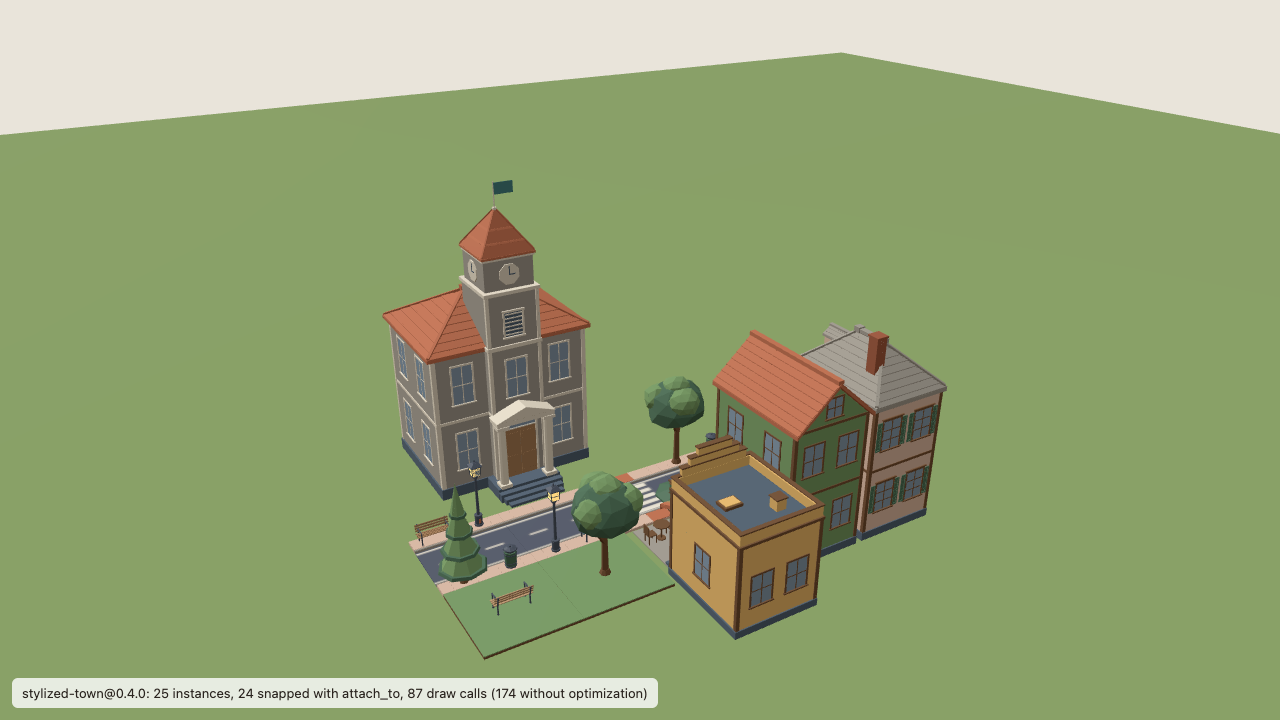
Claude Code (headless) received the prompt below in an empty project, found the kit, installed it with the CLI and wrote this scene. It is shown here exactly as the agent wrote it.
The agent's own report
Shown as the agent wrote it. It is the agent's text, not ours.
The town renders from the project's own entry file with no console errors, and every documented check passed. Final report follows.
Report
Website pages used: /docs (overview), /docs/quickstart, /docs/threejs, /docs/customize (including the variants section), /docs/capabilities, /docs/claude-code, /docs/troubleshooting. The MCP server supplied the kit index, the capabilities of house-01, cafe-01, townhall-01, bench-01 and street-lamp-01, and the Three.js integration guide.
Installed: stylized-town@0.4.0 (256 files, CANDIDATE_UNRELEASED, evaluation licence) into public/assets/stylized-town with the local CLI, pinned in assets.lock.json. SDK stays at the pre-installed 0.5.0 packages (runtime-three, asset-cli, contracts, customization, runtime-r3f) with three 0.186.1. The token was read from the environment only. A scan of every project file for the token value found nothing.
Scene src/scenes/town.scene.json (schema 1.1.0, 25 instances of 12 assets, 24 snapped). Only the first road tile has coordinates. Everything else uses attach_to:
- Street: four straight road tiles and one crosswalk tile chained east to west by their road connectors.
- Furniture on sidewalk sockets: four street lamps, three benches (walnut, blue without armrests, one at 0.9 scale), two litter bins, a mailbox, a street tree and a conifer.
- Two variants of the same asset, house-01@0.2.0, snapped by their lot fronts to the road sides. House A: glazed door, shuttered windows, hip roof, paving walls, curb-stone roof, chimney. House B: panelled door, framed windows, gable roof, leaf walls, terracotta roof, no chimney.
- Cafe-01 with terrace and awning visible, panelled door, lantern-glow walls.
- Townhall-01 with its flag shown and curb-stone walls, facing the street from the south side.
- Two lawn tiles snapped to the road sides as a small park, with a tree and a light-oak bench on their sockets.
src/main.ts imports the scene, loads the kit with AssetLibrary.fromKit and assembles it with the optimize option on, so repeated meshes are GPU-instanced as the town grows. The status bar reports 87 draw calls instead of 174. OrbitControls were added for navigation.
Could not be done:
- Flat roof on a house. The roof slot allows only the gable and hip roof parts. The CLI dry run refused it with INCOMPATIBLE_PART / PART_NOT_ALLOWED. Documented alternatives: pick roof-gable-01 or roof-hip-01, or use a different building model for a flat parapet roof (cafe-01 or shop-01). A new roof shape is L4 geometry authoring, which this kit does not include.
- Three-storey town hall. The town hall declares only flag and wall-color. The dry run refused storeys with UNSUPPORTED_OPERATION / UNKNOWN_CAPABILITY. No building in the kit has more than two storeys, and no geometry operation exists. The documented alternative is another asset or L4 authoring outside the SDK. The town hall stays at its authored two storeys with the flag.
Validation results:
agent-ready-assets verify: PASS, 256 files match the lockfile.scene validate --resolve: PASS, all 24 snaps mate at 0.000 mm. A first draft failed with INSTANCES_OVERLAP because tree canopies reached neighbouring props on the lawn tiles. The park was thinned to fix it.verify-project --browser chromium: LOCALLY_VALIDATED, 25/25 instances placed, ground contact and snaps PASS, screenshot and report in.agent-ready-assets/verify/.tsc --noEmit: clean.pnpm build: succeeded, with only Vite's documented chunk-size warning.- Extra check: the production build served with
vite previewrendered the town in Playwright's Chromium with no errors. Screenshot at.agent-ready-assets/main-ts-preview.png.
Package scripts typecheck, kit:add, validate and verify-project were added so the checks can be repeated. The build copies the kit into dist/, which the evaluation licence does not allow to be published.
Checks of this run
Claude Code (headless), version 2.1.283 (Claude Code). With the MCP server connected.
- Agent finished
- Read website onboarding
- No repository docs
- Used mcp discovery
- Inspected capabilities
- Installed with cli
- Kit installed
- Sdk installed
- No blender no python no repo
- Lockfile pins catalog bytes
- Verify
- Town scene snapped and customized
- Variants of one base
- Vite build
- Verify project locally validated
- Agent ran verify project
- App renders
- Optimization adopted
- Optimization measured
- Reports flat roof refusal
- Reports storey refusal
- No geometry hack
- No credential in project
- No credential in evidence
47 turns, 46 tool calls, 351 seconds.
The prompt the agent received
You are working in a fresh Vite + TypeScript + Three.js project (pnpm; dependencies are already installed, including the
pre-release Agent-Ready Assets SDK 0.5.0 packages and the agent-ready-assets CLI). I have developer-preview access to the
"stylized-town" kit: the registry origin and my API token are already exported in this shell, as the website's setup
pages describe. The Agent-Ready Assets MCP server ("agent-ready-assets") is connected; use it together with the website.

The Agent-Ready Assets website runs on this machine at <site URL> and has all the documentation: start at
<site URL>/docs and follow its onboarding pages. Do not look for documentation anywhere else.

Task: build a small customized town from the "stylized-town" kit, version 0.4.0.
1. Install the kit into this project. Never write the token into any file.
2. Describe the town in a version-pinned scene file, src/scenes/town.scene.json, and render it with the SDK in
   src/main.ts:
   - a street block of road tiles with street furniture (lamps, benches and the like) snapped onto the sidewalks
     instead of hand-placed coordinates;
   - two houses that are variants of the same base house model — the same house asset for both — with different door, window and roof choices and different wall colours from the kit's swatches;
   - a cafe with its terrace;
   - the town hall with its flag.
   The town will grow to a few hundred buildings later, so keep it efficient to render.
3. Also give one of the houses a flat roof, and make the town hall three storeys tall.
4. Validate the installation and the town with the documented checks, up to a LOCALLY_VALIDATED browser verification,
   and make sure pnpm build succeeds.
I have no Blender or Blender MCP. If a requested edit exceeds what the kit allows, say exactly which changes cannot be
made and what documented alternatives exist. Work only inside this project directory. Finish with a short report: the
website pages you used, what you installed (with versions), what you customized and snapped, what could not be done
and why, and the validation results.
Every recorded run
18 of 23 recorded runs passed all their checks. The runs that failed are listed too.
All runs23 runs
| Run | Agent | Setup | Result | Instances |
|---|---|---|---|---|
| codex-m4-website-2026-10-25T22-56-57-407Z | OpenAI Codex CLI (codex exec, headless) codex-cli 0.164.0 | With MCP | Passed | 25 |
| claude-m45-website-nomcp-2026-10-25T22-51-27-099Z | Claude Code (headless) 2.1.283 (Claude Code) | Without MCP | Passed | 25 |
| claude-m45-website-2026-10-25T22-45-19-998Z | Claude Code (headless) 2.1.283 (Claude Code) | With MCP | Passed | 25 |
| codex-m45-website-nomcp-2026-10-25T22-43-39-024Z | OpenAI Codex CLI (codex exec, headless) codex-cli 0.164.0 | Without MCP | Passed | 25 |
| codex-m45-website-2026-10-25T22-41-35-145Z | OpenAI Codex CLI (codex exec, headless) codex-cli 0.164.0 | With MCP | Passed | 25 |
| codex-m45-website-2026-10-25T22-39-36-371Z | OpenAI Codex CLI (codex exec, headless) codex-cli 0.164.0 | With MCP | Passed | 25 |
| codex-m45-website-2026-10-25T22-32-23-300Z | OpenAI Codex CLI (codex exec, headless) codex-cli 0.164.0 | With MCP | Passed | 25 |
| codex-m4-website-nomcp-2026-10-25T03-06-59-456Z | OpenAI Codex CLI (codex exec, headless) codex-cli 0.164.0 | Without MCP | Passed | 24 |
| codex-m4-website-2026-10-25T03-05-16-909Z | OpenAI Codex CLI (codex exec, headless) codex-cli 0.164.0 | With MCP | Failed | 25 |
| codex-m4-website-nomcp-2026-10-25T01-30-43-993Z | OpenAI Codex CLI (codex exec, headless) codex-cli 0.164.0 | Without MCP | Failed | 27 |
| codex-m4-website-2026-10-25T01-29-19-118Z | OpenAI Codex CLI (codex exec, headless) codex-cli 0.164.0 | With MCP | Failed | 23 |
| claude-m4-website-nomcp-2026-10-25T01-23-34-829Z | Claude Code (headless) 2.1.283 (Claude Code) | Without MCP | Passed | 29 |
| claude-m4-website-2026-10-25T01-15-52-092Z | Claude Code (headless) 2.1.283 (Claude Code) | With MCP | Passed | 32 |
| codex-m35b-town-nomcp-2026-10-24T13-09-01-086Z | OpenAI Codex CLI (codex exec, headless) codex-cli 0.164.0 | Without MCP | Passed | 22 |
| codex-m35b-town-2026-10-24T13-07-15-340Z | OpenAI Codex CLI (codex exec, headless) codex-cli 0.164.0 | With MCP | Passed | 28 |
| codex-m35b-town-2026-10-24T13-03-35-420Z | OpenAI Codex CLI (codex exec, headless) codex-cli 0.164.0 | With MCP | Failed | 21 |
| claude-m35b-town-nomcp-2026-10-24T12-57-51-025Z | Claude Code (headless) 2.1.283 (Claude Code) | Without MCP | Passed | 52 |
| claude-m35b-town-2026-10-24T12-53-43-570Z | Claude Code (headless) 2.1.283 (Claude Code) | With MCP | Passed | 34 |
| codex-m35b-town-nomcp-2026-10-24T08-18-00-823Z | OpenAI Codex CLI (codex exec, headless) codex-cli 0.164.0 | Without MCP | Passed | 31 |
| codex-m35b-town-2026-10-24T08-16-23-836Z | OpenAI Codex CLI (codex exec, headless) codex-cli 0.164.0 | With MCP | Passed | 21 |
| codex-m35b-town-2026-10-24T08-09-52-116Z | OpenAI Codex CLI (codex exec, headless) codex-cli 0.164.0 | With MCP | Failed | 25 |
| claude-m35b-town-nomcp-2026-10-24T08-05-13-617Z | Claude Code (headless) 2.1.283 (Claude Code) | Without MCP | Passed | 36 |
| claude-m35b-town-2026-10-24T08-00-23-370Z | Claude Code (headless) 2.1.283 (Claude Code) | With MCP | Passed | 31 |